Who's Gonna Tell Vibe Coders About These Things?
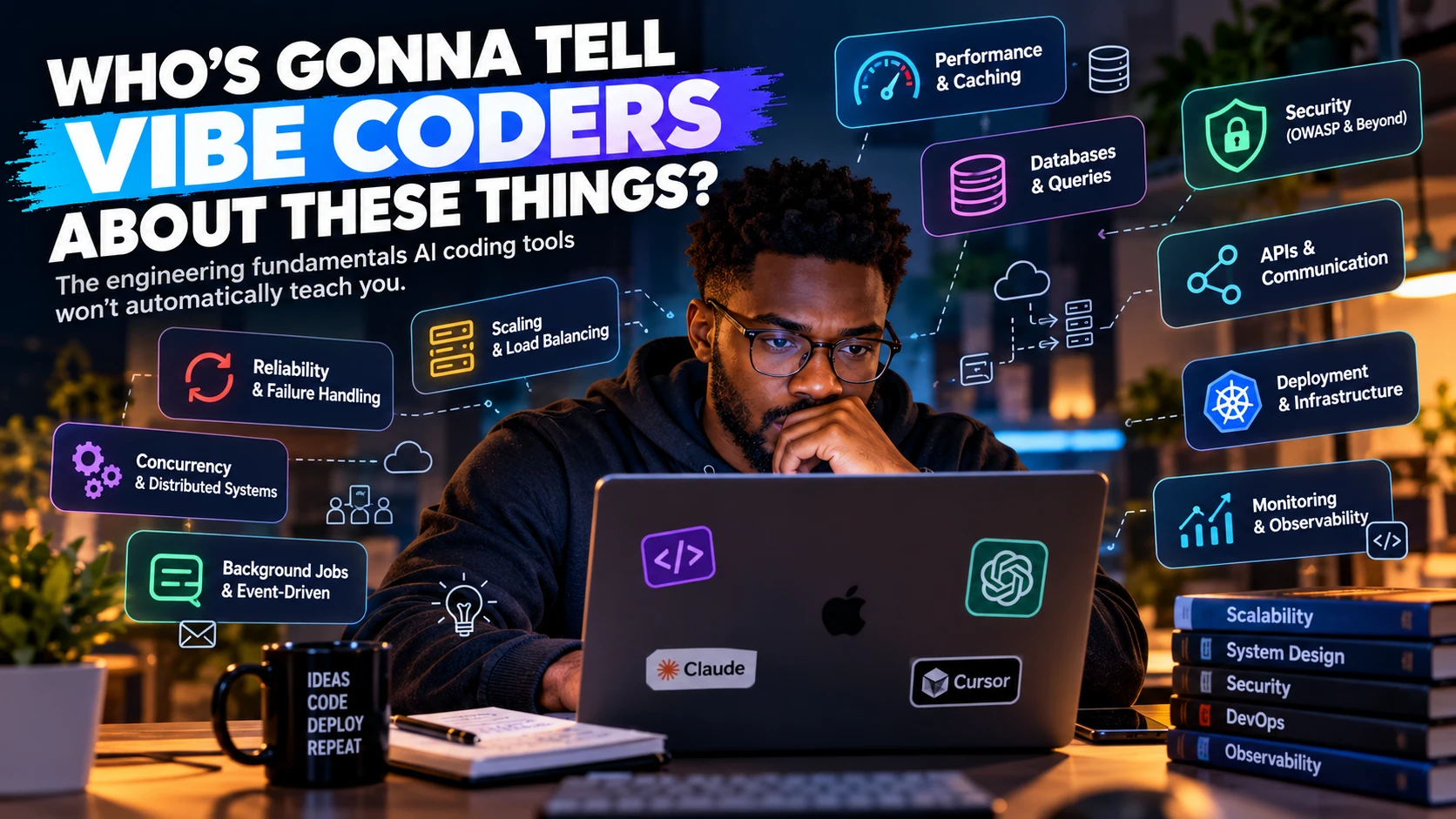
AI can build your app. But do you know what happens when 5,000 people use it, your database slows down, or your payment provider goes offline?
Vibe coding has changed how software gets built. With Claude Code, Cursor and other AI coding assistants, you can describe an idea, generate components, connect a database, add authentication and ship a working app without writing every line yourself.
That's a good thing. More people can experiment, launch products and turn ideas into real businesses, and developers spend less time on repetitive work.
But there's a catch: making something work is not the same as understanding why it works, what could break it, and how to fix it when it does.
Your app might work perfectly with five test users. What happens when 5,000 arrive? What if two people buy the last ticket at the same moment? What if your payment provider charges a customer but your app never receives the confirmation? What if your AI-generated code ships a secret key to the browser?
These aren't rare edge cases. They're everyday engineering problems.
I came across a list on TikTok (shared by Tech With Kingsley) of over 100 concepts vibe coders should know: caching, indexing, race conditions, distributed systems, security, deployment strategies, disaster recovery and more. Instead of just repeating the terms, I've grouped them into ten areas and explained what each one means in plain language, with examples.
You don't need to master all of them before you build. You need to recognise when one of them applies to what you're building.
1. Performance & Caching: why is my app suddenly slow?
An app can feel fast in development and become painfully slow as users, requests and data grow. Performance work is about finding where time is actually being spent.
Caching stores the result of expensive work so you don't repeat it for every request. A car marketplace showing the same listings to thousands of visitors can cache that response instead of rebuilding it each time.
Cache invalidation is the hard part: deciding when a cached copy is out of date and removing or refreshing it. When a car is sold, you don't want a cached page still showing it as available.
CDN and edge caching. A content delivery network serves files from servers close to your users. Edge caching keeps copies of cacheable content (images, scripts, stylesheets, sometimes whole pages) at those locations, so requests travel less distance and your own server does less work.
Latency, throughput and tail latency describe different sides of speed:
- Latency: how long one operation takes.
- Throughput: how much work the system completes per second (or minute).
- Tail latency: how slow your slowest requests are.
- P99 latency: the time within which 99% of requests finish. The slowest 1% take longer.
An average response time of 100 ms sounds great, but if 1% of requests take several seconds, a lot of real people are still having a terrible time. That's why teams watch P95/P99, not just the average.
Build caching lets build tools reuse previous results when the inputs haven't changed, which speeds up local builds and CI/CD pipelines.
Why this matters: a fast demo is not proof of a fast app. Measure real workloads, find the actual bottleneck and fix that, rather than guessing.
2. Databases & Queries: where most slow apps really slow down
Database indexing. An index lets the database find rows without scanning the whole table. Searching a million vehicle listings by registration number goes from slow to instant with the right index. Indexes cost storage and slow down writes a little, so add them for queries you actually run, not everywhere.
Query optimization means making the database do less work: reading the query plan (EXPLAIN), selecting only the columns you need, filtering early and using suitable indexes.
N+1 queries. You fetch 100 cars, then run one more query per car to get its dealership: 101 queries instead of one or two. AI-generated code with ORMs does this a lot. Fetch related data together (a join, or your ORM's "include"/"eager load" option).
Connection pooling. Opening a new database connection for every request is slow. A pool reuses a fixed set of connections. Too many connections can overwhelm the database; too few makes requests queue up. This is especially important on serverless platforms, where every function instance can open its own connections.
Read replicas are copies of the database that serve read queries. They take load off the main database but usually lag slightly behind it, so a user might not see their own update for a moment.
Replication, sharding and partitioning:
- Replication: keeping copies of the same data on several machines.
- Partitioning: splitting a large table into smaller pieces (for example, by month), often inside one database.
- Sharding: spreading data across several separate database servers, each holding part of it.
All of these add capacity but also complexity. Most apps don't need sharding for a long time.
Database migrations and schema versioning. Migrations are controlled, versioned changes to your database structure. During a deploy, old and new versions of your app may run at the same time, so a migration that renames or drops a column can break the version that's still running. Make changes in safe steps: add the new column, deploy code that uses it, then remove the old one later.
Why this matters: most "my app is slow" problems are database problems. The fix is usually an index, a better query or fewer queries, not a bigger server.
3. Scaling & Load Balancing: what happens when more users arrive?
Rate limiting caps how often a user, IP address or API key can make requests in a period. It protects you from abuse, scraping, brute-force logins and one client hogging everything.
Load balancing spreads requests across several servers. It adds capacity and keeps you online if one server dies, but if every server depends on one overloaded database, the database is still your limit.
Reverse proxies (like Nginx) sit in front of your servers, receive requests on their behalf and can route traffic, handle TLS, compress responses and cache.
API gateways are a managed front door for your APIs that can handle routing, authentication, rate limiting and request validation in one place. They overlap with reverse proxies but are aimed at managing APIs specifically.
Horizontal vs vertical scaling:
- Horizontal: add more servers or instances. More capacity and resilience, but your app must not keep important state in one server's memory.
- Vertical: give one server more CPU or memory. Simpler, but there's a ceiling.
Autoscaling adds and removes capacity automatically based on load. It needs sensible limits: scaling your app to 50 instances doesn't help if your database can only handle 10 of them.
Service discovery lets services find each other when their addresses keep changing (containers starting and stopping) instead of hardcoding IP addresses.
DNS turns domain names into addresses. Records are cached for a period called the TTL, which is why a DNS change can take time to reach everyone.
Cold starts and serverless limits. A serverless function that hasn't run for a while takes extra time to start: a cold start. Serverless platforms also limit execution time, memory, request size and concurrency, which makes them a poor fit for some workloads (long video processing, for example).
Cost optimization. More servers, more logs and more data transfer all cost money. Know what drives your bill, remove idle resources and set budget alerts, because an autoscaling bug can become a very expensive surprise.
Why this matters: scaling isn't just "add servers". It's knowing where your limits are and what each extra user costs you.
4. Reliability & Failure Handling: what happens when something breaks?
Networks fail. APIs go down. Requests hang. Reliable systems expect this.
Timeouts. Never wait forever. Without a timeout, one slow dependency can tie up all your server's resources.
Retries and exponential backoff. Retrying a failed request is often fine, but wait longer between each attempt (1s, 2s, 4s…) and add a little randomness ("jitter") so thousands of clients don't all retry at the same instant. Always cap the number of retries.
Idempotency. An operation is idempotent if doing it twice has the same effect as doing it once. This is what makes retries safe. Payment APIs like Stripe accept an idempotency key so that retrying a "charge customer" request doesn't charge them twice.
Circuit breakers stop calling a dependency that keeps failing, fail fast for a while, then test it again. This protects your app and gives the failing service room to recover.
Health checks tell load balancers and platforms whether an instance is working, so traffic goes only to healthy ones.
Liveness and readiness probes (Kubernetes):
- Liveness: "Is this container stuck? Restart it."
- Readiness: "Is this container ready for traffic right now?"
Mixing them up causes outages. If your liveness check fails whenever the database is briefly unavailable, Kubernetes will restart perfectly healthy app containers over and over.
Failover switches to a backup system when the main one fails. It needs reliable failure detection and a plan to avoid two systems both thinking they're in charge.
Backups and disaster recovery. Backups protect against data loss, deletion and corruption. Disaster recovery is the full plan for getting the service back: how much data you can afford to lose, how long you can be down, who does what. A backup you've never restored is a hope, not a plan. Test restores regularly.
Multi-region deployments run your service in more than one geographic region for resilience and lower latency. They bring hard problems (data replication, routing, failover, cost) and only make sense when you have a real need for them.
Chaos engineering deliberately causes controlled failures (kill an instance, slow a dependency) to prove your system copes. Start small, set clear limits and have a way to stop the experiment.
Production incidents, on-call and postmortems. An incident is anything that hurts a live service or its users. On-call means someone is clearly responsible for responding. A postmortem afterwards records what happened, why, how it was fixed and what will change, focusing on improving the system rather than blaming a person.
Why this matters: reliability isn't never failing. It's noticing failures quickly, limiting the damage and recovering predictably.
5. Concurrency & Distributed Systems: what if two things happen at once?
Some of the worst bugs only appear when operations overlap.
Race conditions. Two customers try to buy the last ticket. Both requests check "is there a ticket left?", both see yes, and both buy it. Now you've sold one ticket twice.
The simplest fix is to make the check and the update one atomic operation in the database:
UPDATE events
SET tickets_sold = tickets_sold + 1
WHERE id = 42 AND tickets_sold < capacity;
If the query updates zero rows, the event is sold out. Two requests can't both win.
Optimistic locking assumes conflicts are rare. Each record has a version number; when saving, you check the version hasn't changed since you read it. If it has, retry or reject.
Pessimistic locking locks the record while you work on it so nobody else can change it. Safer when conflicts are common, but heavy locking slows everyone down.
Distributed locks coordinate access across several servers (often using Redis or a database). They're tricky: locks can expire while you're still working, and servers can crash while holding them. For most data changes, a database transaction or an atomic update like the one above is simpler and safer.
Deadlocks. Transaction A holds row 1 and waits for row 2; transaction B holds row 2 and waits for row 1. Neither can continue. Databases detect this and cancel one, so your code must handle that error, usually by retrying.
Thread safety. Code is thread-safe if it behaves correctly when several threads run it at once. Shared, changeable data without proper coordination produces random, hard-to-reproduce bugs.
Memory leaks and garbage collection. A memory leak is memory your program holds on to but no longer needs, so usage grows until it crashes. Garbage collection frees memory that nothing references any more, but it can't help if your code is still holding references, such as an ever-growing in-memory cache or listeners that are never removed.
Distributed transactions try to make changes across several services or databases succeed or fail together. That's hard and slow across independent systems, which is why many teams use sagas instead.
The Saga pattern splits a long business process into steps, each with an "undo" (a compensating action). Booking flow: reserve the seat, authorise payment, confirm the booking. If confirmation fails, release the seat and void the payment authorisation.
CAP theorem. When the network splits your system in two (a partition), a distributed database must choose: stay available and risk returning stale data, or stay consistent and refuse some requests. It's a trade-off you make during failures, not "pick two of three forever".
Eventual consistency. Copies of data may disagree for a short time but catch up. Your app must cope with a value the user just saved not showing up everywhere immediately.
Leader election picks one server to coordinate certain work (like running a scheduled job once). It must prevent two servers both believing they're the leader.
Network partitions and clock skew. Servers can lose contact with each other while still running, and their clocks are never perfectly in sync. Don't rely on messages arriving instantly or on timestamps from different machines agreeing exactly.
Why this matters: code that works for one request can fail when many requests compete for the same data. Once your app spans several machines, delays and partial failures are normal, not exceptional.
6. Background Jobs & Event-Driven Work
Not everything needs to finish before the user gets a response.
Cron jobs run on a schedule: nightly reports, cleaning up expired records, syncing data. Monitor them, and make sure two runs can't overlap or do the same work twice.
Message queues hold work to be processed later. Your checkout can put "send confirmation email" on a queue and respond to the customer immediately, instead of making them wait for the email provider.
Pub/Sub (publish/subscribe) lets one event reach many listeners. One OrderPlaced event can update inventory, record analytics and notify the customer, without the order code calling each of them directly.
Event-driven architecture builds the system around events like these. It reduces direct dependencies between parts of the system, but makes debugging, ordering and consistency harder.
Most queues deliver a message at least once, so the same message can arrive twice. Your handlers need to be idempotent (see section 4).
Dead letter queues collect messages that keep failing after the allowed retries, so you can inspect and replay them instead of losing them or retrying forever.
Backpressure stops a fast producer from overwhelming a slow consumer, by limiting queue size, slowing down intake or rejecting extra work. Without it, a short slowdown can grow until the system runs out of memory.
Why this matters: async work makes apps feel faster, but your system must handle jobs that are delayed, duplicated, out of order or never complete.
7. APIs & Communication: how your systems talk to each other
TCP vs UDP. TCP gives a reliable, ordered connection: everything arrives, in order. UDP just sends packets with no delivery guarantees but less overhead, which suits things like live video, games and voice calls. Neither is "better"; it depends on the job.
HTTP/2 and HTTP/3. HTTP/2 sends many requests over one connection at the same time (multiplexing). HTTP/3 runs on QUIC, which is built on UDP and handles lost packets and changing networks (like switching from Wi-Fi to mobile data) better.
Real-time updates, three ways:
- WebSockets: a persistent, two-way connection. Good for chat, multiplayer and collaborative editing.
- Server-Sent Events (SSE): the server streams updates to the browser over normal HTTP; the client sends nothing back over it. Good for live feeds, notifications and streaming AI responses.
- Long polling: the client asks, the server holds the request open until there's news (or a timeout), then the client asks again. A fallback when the other two aren't available.
gRPC is a fast framework for service-to-service calls. It runs over HTTP/2, uses Protocol Buffers by default and supports streaming. Browsers need gRPC-Web or a proxy to use it.
Webhooks are another system calling *your* server when something happens, such as "payment succeeded". Handle them carefully:
- verify the signature, so you know it really came from the provider;
- respond quickly and do the heavy work in the background;
- expect the same event more than once and out of order.
API versioning lets your API change without breaking the apps already using it (for example /v1/ and /v2/), with a clear plan for deprecating old versions.
Semantic versioning uses MAJOR.MINOR.PATCH: major for breaking changes, minor for new backward-compatible features, patch for backward-compatible fixes. Version numbers state intent; they don't guarantee nothing broke.
Why this matters: every connection carries assumptions about delivery, timing, identity and compatibility. Make those assumptions explicit.
8. Security: the problems you don't want to find in production
A login page that works doesn't make an app secure.
Broken access control is the number one risk on the OWASP Top 10, and the one I see most in AI-generated apps. Being logged in is not the same as being allowed. If changing /api/orders/123 to /api/orders/124 shows someone else's order, you have a serious bug. Check on the server, for every request, that this user may access this specific record. If you use Supabase or Firebase, make sure Row Level Security or security rules are switched on and actually tested.
Secrets management. API keys, database passwords and signing secrets must never reach the browser or your Git history. In Next.js, anything prefixed NEXT_PUBLIC_ (or VITE_ in Vite) is bundled into code anyone can read. Keep secrets on the server, restrict who can read them and rotate them if they leak.
SQL injection happens when user input is pasted into a SQL query, letting an attacker change what the query does. Use parameterised queries or your ORM's safe methods; never build SQL by string concatenation.
XSS (cross-site scripting) happens when an attacker gets their script to run in other users' browsers through your site. Let your framework escape output, and be very careful with raw HTML (dangerouslySetInnerHTML, v-html) and user-generated content.
CSRF (cross-site request forgery) tricks a logged-in user's browser into sending a request they didn't intend. Protections include CSRF tokens, SameSite cookies and checking the request's origin.
SSRF (server-side request forgery). If your app fetches a URL the user provides (link previews, image imports), an attacker can point it at your internal services or cloud metadata endpoints. Validate and restrict the destinations your server is allowed to reach.
CORS is a browser rule that controls which other websites' scripts may read responses from your API. It is not authentication: it doesn't stop requests from scripts, servers or tools like curl. Don't "fix" CORS errors with * on an API that uses cookies or returns private data.
WAF and DDoS protection. A web application firewall filters malicious HTTP traffic; DDoS protection absorbs floods of traffic meant to knock you offline. Both help, and neither fixes bugs in your own code.
IAM (identity and access management) controls which people and services can access which resources. Follow least privilege: give each person, key and service only the permissions it needs.
OAuth lets an app get limited access to a user's account elsewhere without ever seeing their password ("Sign in with Google" uses it). OAuth is about authorisation; OpenID Connect, built on top of it, handles identity (who the user is).
JWT rotation. JSON Web Tokens carry signed claims about a user. Keep them short-lived, rotate refresh tokens, have a plan for revoking access and rotate signing keys. A JWT isn't secure just because it's signed, and anyone can read what's inside one.
TLS and encryption:
- Encryption in transit: protects data moving between systems. TLS (the "S" in HTTPS) is how you do it.
- Encryption at rest: protects stored data such as database files and backups.
Encryption is only as strong as how well you protect the keys.
Dependencies. AI assistants sometimes suggest packages that are outdated, vulnerable or don't exist at all, and attackers register those made-up names. Check that a package is real and maintained before installing it, and run npm audit (or your ecosystem's equivalent).
Why this matters: security flaws leak user data, enable account takeovers, cost money and destroy trust. They're far cheaper to prevent than to clean up after.
9. Deployment & Infrastructure: getting code to production safely
CI/CD (continuous integration and delivery/deployment) automates testing, building and releasing. A pipeline might run tests, check dependencies, build the app and deploy an approved version.
Docker packages your app with everything it needs, so it runs the same way on your laptop and in production. Containers aren't a complete security boundary by themselves.
Kubernetes runs and manages containers at scale: scheduling, scaling, health checks and rollouts. It's powerful and complex, and most small apps don't need it.
Infrastructure as code and Terraform. Define servers, databases and networks in version-controlled files instead of clicking around a dashboard. Terraform is a popular tool for this. Changes can be reviewed like code and repeated reliably.
Helm charts package and configure applications for Kubernetes. Wrong values in a chart can still take production down.
Feature flags turn features on or off without a new deploy, which is great for gradual releases and instant kill switches. Remove old flags, or they pile up into confusion.
Release strategies:
- Blue-green: run the new version alongside the old, switch traffic over, and switch back instantly if something's wrong.
- Canary: send the new version to a small slice of users first, watch the metrics, then expand.
- Rolling: replace old instances with new ones gradually. Old and new versions run side by side for a while, so they (and the database) must work together.
Rollbacks put the previous version back. Database changes, sent emails and processed payments can't simply be undone, so design migrations and releases with rollback in mind.
Dependency hell is when packages need conflicting versions of each other. Commit your lockfile, update dependencies regularly in small steps and run your tests.
Why this matters: shipping is a process, not a button. Safe releases need repeatability, compatibility checks, verification and a way back.
10. Monitoring & Observability: how do you know something is wrong?
If your app breaks at 2 a.m., you need more than a screenshot from a user.
Logging records events and errors with enough context to understand them. Never log passwords, tokens or unnecessary personal data.
Metrics are numbers over time: request counts, error rates, response times, CPU and memory. They show trends and sudden changes.
Monitoring and alerting. Monitoring watches the system's health; alerting notifies someone when something needs action. Every alert should be actionable. Noisy alerts teach people to ignore all of them.
Distributed tracing follows one request through every service it touches (gateway, order service, database, payment provider), so you can see where it slowed down or failed.
Observability is being able to work out what's happening inside your system from its outputs (logs, metrics and traces), including problems you didn't predict.
SLIs, SLOs and error budgets:
- SLI (service level indicator): what you measure, such as the percentage of successful requests.
- SLO (service level objective): your target, such as 99.9% successful requests over 30 days.
- Error budget: what that target allows to fail. 99.9% leaves 0.1%, which is 1 in every 1,000 requests, or about 43 minutes of total downtime in a 30-day month.
If you're within budget, ship features. If you've used it up, focus on reliability.
Why this matters: you can't improve or maintain what you can't see.
The questions to ask before trusting AI-generated code
When an AI assistant writes code for you, ask:
- Performance: what happens when the data and traffic grow 100×?
- Data: are the queries efficient, and are the right indexes in place?
- Concurrency: what happens if two requests change the same record at the same time?
- Access: can a user see or change data that isn't theirs?
- Secrets: is any key or password reachable from the browser or in the repo?
- Failure: what happens when an external API times out or returns an error?
- Retries: could a repeated request create a duplicate payment, booking or record?
- Deployment: can the new version run safely alongside the current database schema?
- Observability: how will I know when this fails in production?
- Recovery: can I restore the data and get back to a working state?
Then test the answers. An AI's explanation of its own code is not proof that the code is correct.
A practical rule for vibe coders
Use AI to move faster, but don't outsource your engineering judgement.
A small portfolio site doesn't need distributed transactions, multi-region deployment or a Kubernetes cluster. A payment platform, ticketing system, marketplace or anything holding sensitive customer data needs serious attention on access control, concurrency, idempotency, monitoring and recovery.
The goal isn't to implement every pattern on this list. It's to know when each one becomes relevant and what it costs.
Start simple. Measure real behaviour. Test the failure paths. Improve the design when the evidence or requirements call for it.
And before you deploy AI-generated code, ask yourself one question:
If this breaks in production, will I understand what went wrong and know how to recover?
If the answer is no, that's your next thing to learn.
AI can help you write the code. Making sure the software is safe, reliable and fit for the people who use it is still your job.
Run this checklist on your own project
Copy this prompt into Claude Code, Cursor or another AI coding assistant, opened in your project, and fill in the short “About my project” part. It reviews your code against all ten areas, shows where each problem is and doesn’t change anything until you approve.
Production readiness prompt
You are a senior software engineer reviewing my project before it goes to production. Do not change any code yet. Inspect the codebase first, then report.

About my project (fill this in):
- What it does:
- Expected users and traffic:
- Stack and hosting:
- Handles payments or sensitive data? (yes/no)

Review the project against these ten areas. If something genuinely doesn't apply to a project of this size, mark it "Not applicable" and say why.

1. Performance & caching: slow pages or endpoints, caching and cache invalidation, CDN and static assets, build caching.
2. Databases & queries: missing indexes, N+1 queries, inefficient queries, connection pooling (especially on serverless), migrations that are safe while old and new code run together.
3. Scaling & traffic: rate limiting on public and login endpoints, state kept in server memory, autoscaling and serverless limits (timeouts, cold starts), cost risks.
4. Reliability: timeouts and limited retries with backoff on external calls, idempotency for payments, bookings and webhooks, health checks, backups and whether a restore has been tested.
5. Concurrency: race conditions (for example, two users buying the last item), check-then-write logic that should be one atomic operation, locking, memory leaks.
6. Background jobs: cron jobs that can overlap or run twice, queue handlers that aren't idempotent, missing failure or dead-letter handling.
7. APIs & communication: webhook signature checks and duplicate handling, API versioning, cleanup of WebSocket or SSE connections.
8. Security: broken access control (can a user read or change someone else's data by changing an ID?), secrets exposed to the browser or committed to git, SQL injection, XSS, CSRF, SSRF, CORS settings, session and JWT handling, database rules (Supabase RLS, Firebase rules), vulnerable, outdated or non-existent dependencies.
9. Deployment: CI/CD and tests, environment variables, migration and rollback plan, lockfile and dependency health.
10. Monitoring: error tracking, useful logs without sensitive data, alerts. How would I know this broke at 2 a.m.?

For every finding, give:
- Area and a one-line title
- Severity: Critical / High / Medium / Low
- Evidence: exact file path and line, or the endpoint
- Why it matters for this project
- The smallest fix that solves it

Rules:
- Only report what you can confirm in the code. List anything you suspect but can't confirm under "Needs checking", with what I should check.
- Don't recommend complex infrastructure (Kubernetes, microservices, multi-region) unless this project clearly needs it.

Finish with:
1. A table of the ten areas, each marked Good / Needs work / Not applicable / Couldn't verify.
2. The top 5 fixes, in the order I should do them.
3. A verdict: is this ready for production? If not, what must be fixed first?

Wait for my approval before changing any code.